

Snappy for Blender: 3D Printed Parts That Fit First Time

Every maker knows this one: you design a lid, a peg or a snap-fit, print it, and it's too tight. So you nudge the model, export, print again, and now it rattles. I got sick of the guesswork, so I built Snappy, a Blender add-on that makes 3D printed parts fit together first time, and splits models that are too big for your printer into pieces that slot back together.
The quick version
- Clearance-aware cuts: pick a base and a cutter, choose a press, slide or loose fit, and Snappy cuts both mating parts with the right gap.
- Dial in your printer: print the built-in clearance test once and you'll know exactly which fit works on your machine.
- Split big models (Pro): Auto-Cut places the fewest seams so every piece fits your bed, adds connectors sized to each wall, and lays the pieces out on plates.
- Make, line up and export: exact-size shapes, two-click alignment, mesh repair, and export straight to STL, OBJ or 3MF.
- Snappy Free covers the core fitting workflow. Pro adds the splitter, shaper, aligner and multiple cutters.
The problem Snappy solves
Printers don't print exactly to size. Plastic spreads a little, holes come out smaller and pegs come out bigger, so two parts modelled to fit perfectly in CAD won't fit once printed. The fix is a clearance, a small gap between mating parts. Doing it by hand in Blender means offsetting surfaces, juggling Boolean modifiers and re-exporting every time you change your mind.
Snappy does all of that for you, in real millimetres, and keeps your original shapes so you can keep adjusting until you're happy.

Parts that fit first time
- Press, slide and loose fits, or set your own clearance per cutter in Pro.
- A printable clearance test so you find the fit that works on your printer, instead of guessing.
- Non-destructive previews: move the cutter around and the cut follows, before you apply anything.

- Several cutters on one base (Pro), each with its own colour, fit and order, kept organised as cutting sets.
- Ease-In Entry (Pro) bevels the mouth of a hole or pocket so parts slide in smoothly.
- Protected stop faces keep intentional flush stops on lids, rails and connectors.
Split models that are too big for your printer
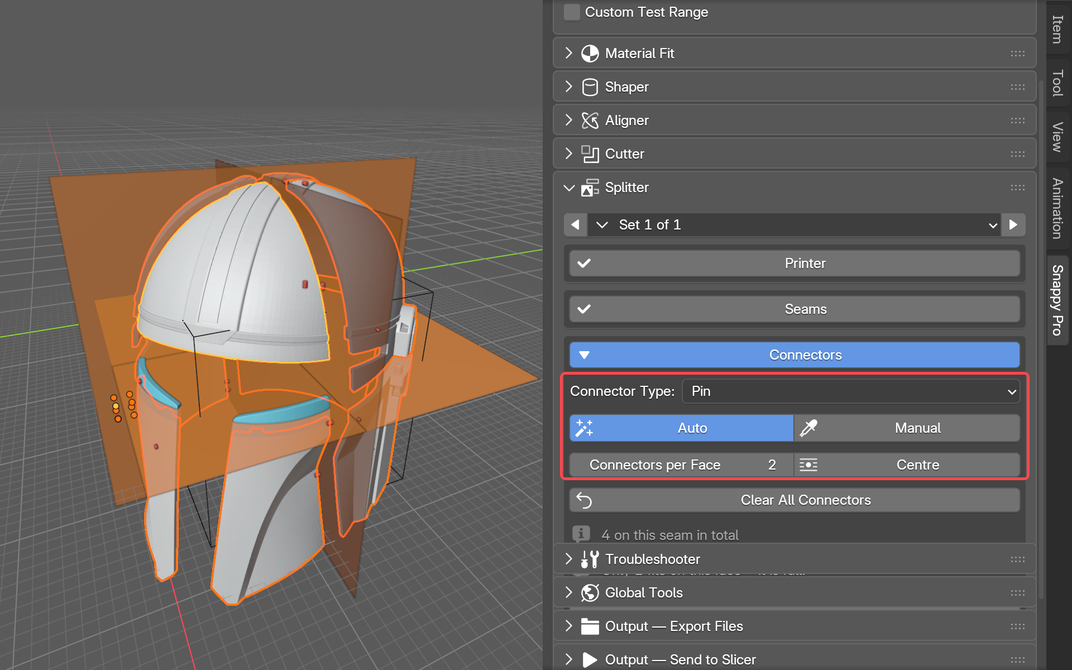
Big helmets, cosplay pieces and props rarely fit on one bed. Snappy Pro's Part Splitter does the hard part:
- Auto-Cut places the fewest seams that make every piece fit your printer.
- It adds connectors sized to each wall, plus a Connector Test print to check the fit.
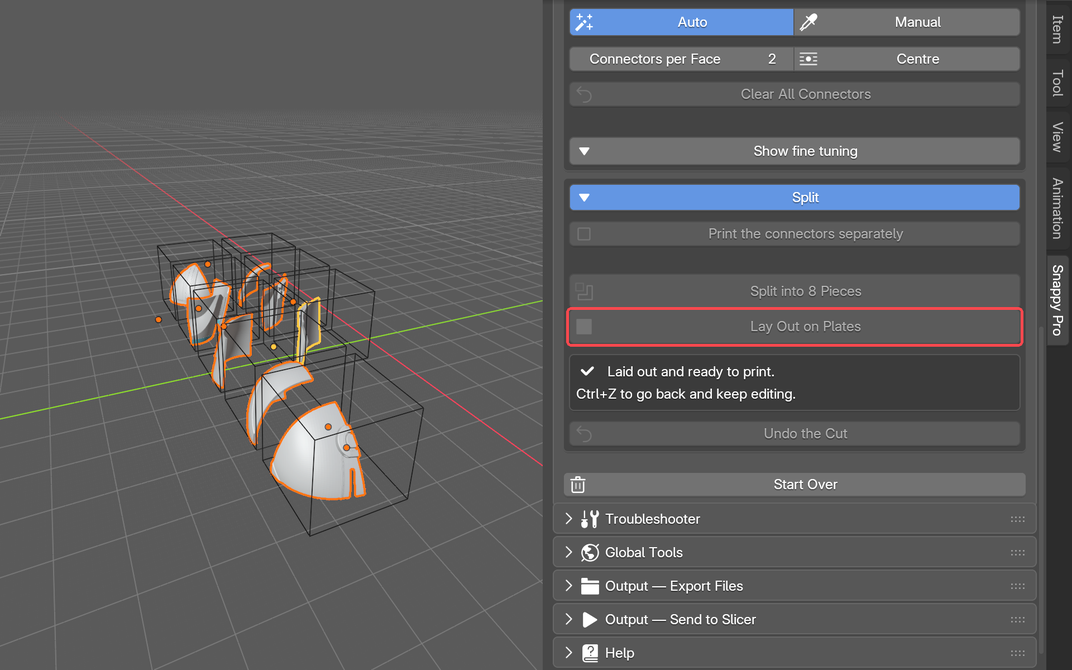
- It lays the pieces out on plates, ready to print, with your printer's bed drawn under the part.
- Auto Align puts the split model back together to check it.
Make, line up and fix parts
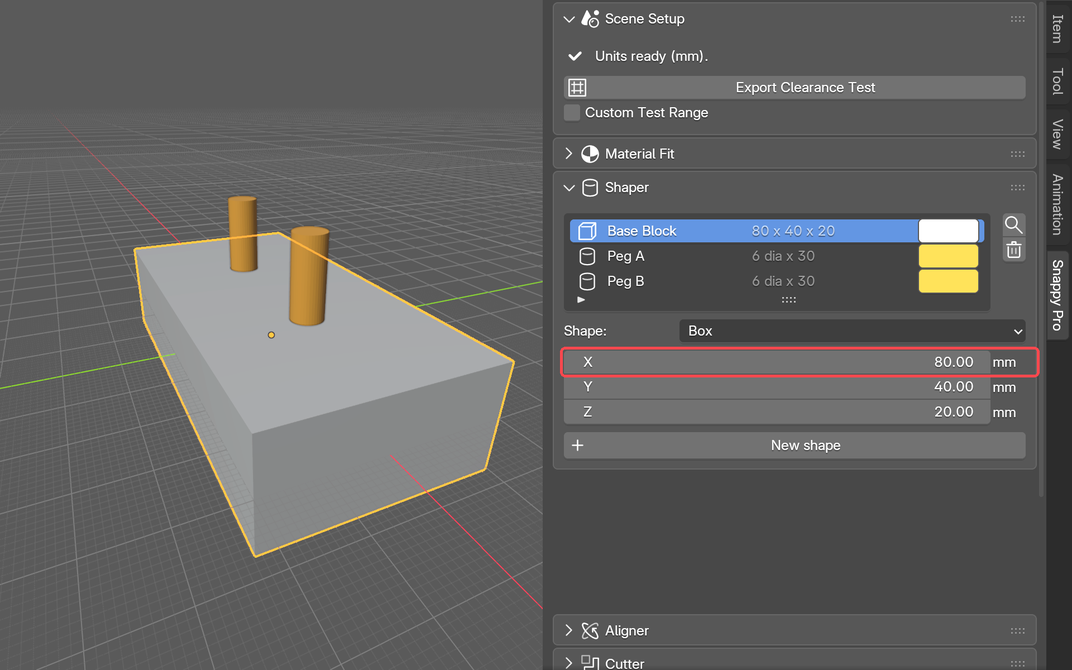
- Shaper (Pro): boxes, cylinders, tubes, cones and spheres to exact sizes. Type a new number and the shape rebuilds, even after it's been split.
- Aligner (Pro): Flush, Same Axis, Centre On and Match, with a ghost preview of where the part will land before you click.

- Geometry diagnosis and repair: broken meshes are the main reason Booleans fail, so Snappy finds the problems and guides you through fixing them.
- Lay on Face and Drop to Plate, then export STL, OBJ or 3MF, or hand the project straight to your slicer.
Who it's for
- Makers designing functional parts: lids, snap-fits, inserts, hinges and enclosures.
- Cosplayers and prop makers splitting big models to fit their printer.
- Print sellers who need parts to fit every single time, without reprints.
- Blender users who want CAD-style fits without leaving Blender.
Free vs Pro
Snappy Free gives you clearance-aware cuts, press/slide/loose fits, the clearance test, geometry repair, export, Lay on Face and Drop to Plate. Snappy Pro adds the Part Splitter, connectors, Shaper, Aligner, custom clearance, union and intersect, multiple cutters per base, live updates and a high-poly preview. Pro is a one-off payment with every future update included, and one key covers two of your own computers. It's currently half price during Early Access.
Snappy works with Blender 4.3 and newer on Windows, macOS and Linux. Install it from Extensions → Install from Disk, prepare the scene units, then select a base and a cutter. The Snappy page has the quick start guide.
Get Snappy
 Snappy Free
 Snappy Pro
Got an idea or found a bug? Use Report a Snappy Issue inside Blender, or join the community and tell me directly.
More guides
 Scrubbler Nozzle Wiper for Bambu Lab P1S: Install Guide and Fix
 Bambu Lab Prints Not Sticking? How to Fix Bed Adhesion
 How to Tell If Filament Is Wet, and the Best Ways to Dry It
Common questions
How do I make 3D printed parts fit together in Blender?
Add a clearance (a small gap) between mating parts. Snappy does it automatically: pick a base and a cutter, choose a press, slide or loose fit, and it cuts both parts with the right gap in real millimetres.
What clearance should I use for 3D printed parts?
It depends on your printer and material. Snappy's printable clearance test shows which fit works on your machine, so you can stop guessing.
Can Snappy split a model that's too big for my printer?
Yes, Snappy Pro's Part Splitter places the fewest seams so every piece fits your bed, adds connectors sized to each wall, and lays the pieces out on plates.
Is Snappy free?
Snappy Free covers the core fitting workflow at no cost. Snappy Pro is a one-off payment that adds the Part Splitter, Shaper, Aligner and more, with future updates included.
Which Blender versions does Snappy support?
Blender 4.3 and newer, on Windows, macOS and Linux.

About the author: Martin Kidd
I'm the one-man team behind LayerLab. I design, print, test and ship original 3D-printed products from home in Australia, like my Blind Stopper, and share what I learn on YouTube.
Snappy is made by me, LayerLab, so I earn from Snappy Pro sales.